

New 3D Gamut Viewer in ChromaChecker
For those of you who follow me, you know I’m a huge proponent of ChromaChecker. So much so that we have our own branded instance at alder.chromachecker.com. Not only do we have dozens of our clients on this platform but we use it for all of our professional services – creating G7 curves and doing color conformance. ChromaChecker offers an absolute arsenal of color functionality, but one thing that it’s been lacking is a 3D Gamut Viewer – until now!
3D gamut viewers are routinely used by color experts to visualize and compare color spaces, in the form of ICC profiles. Much information can be gathered by analyzing the data gathered from this, including whether or not any given spot color can be achieved – and how closely. ChromaChecker has had functionality called “Virtual Spot Print” to determine whether a spot color can be achieved, based on prediction of Delta E values for each. You can quickly and easily run an entire color library through any ICC profiles uploaded – and now you can visualize it, too!
In the ChromaChecker online dashboard, click on the color inspector. Click the Assets tab and choose any color palette or library (if you don’t have any yet, you can upload any CxF file or manually measure colors in the Capture software). Then click the Virtual Spot Print bottom at the bottom left. Below is a screenshot of the results you will see.
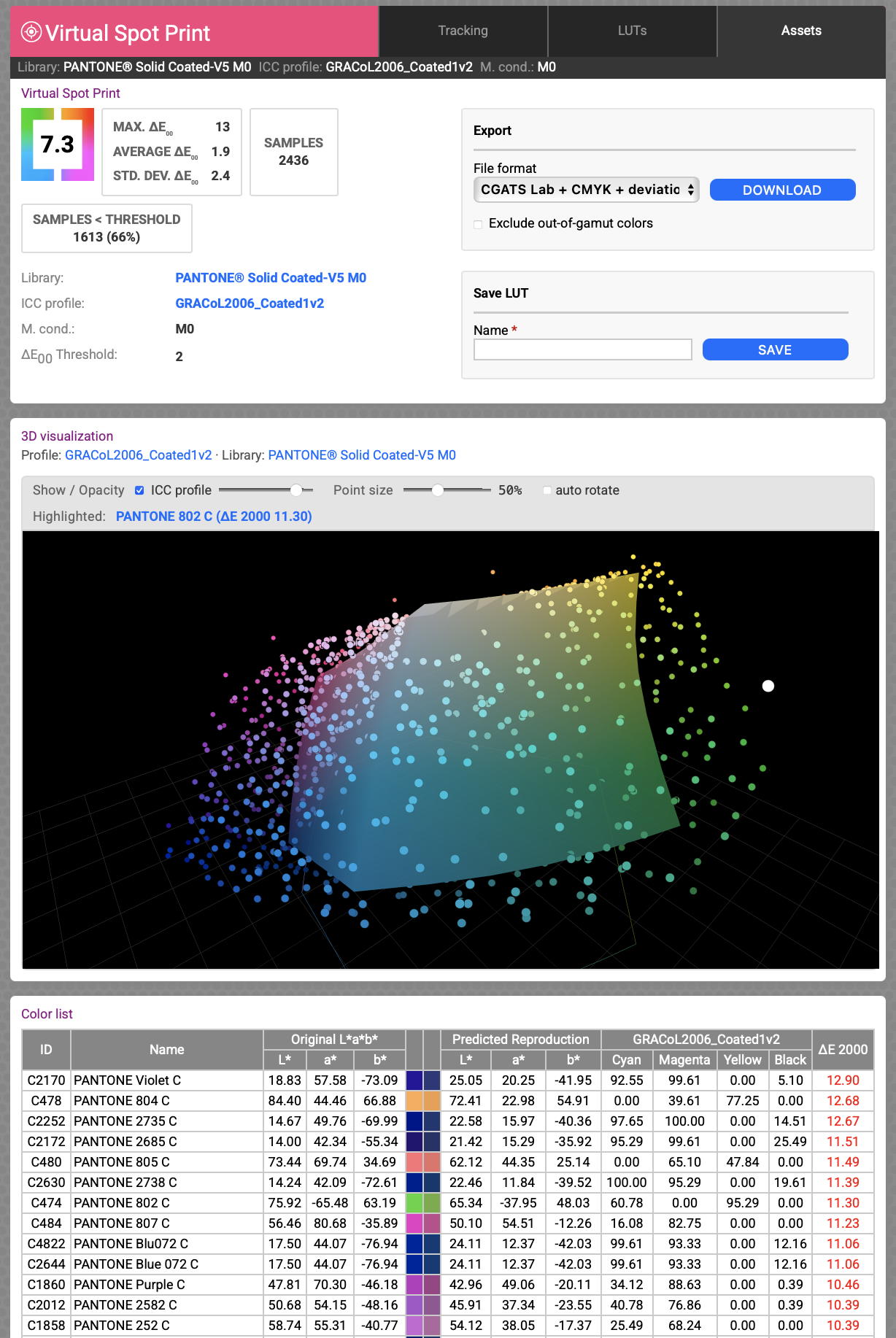
You can now visualize whether the color is in or out of gamut. And the Color List below shows the Original L*a*b* values and the Predicted Reproduction L*a*b* and (device dependent) CMYK values, as well as the dE2000 value. It even shows a small color patch of the original and predicted colors, side-by-side. And, you can hover your cursor over any dot to highlight it, and it shows you exactly which color and what the DeltaE value is.
The 3D Gamut viewer can also be used in comparing profiles in the ICC Inspector. Simply elect 2 profiles and click compare at the bottom. This will show you Profile Info, DeltaE Difference, Solid Color Values with Delta differences, Substrate Values with Delta differences, 3D Gamut Viewer, Black Generation, Grey Neutral rendering curves, Colorimetric TVI (dot gain) curves, and more.
Overall, it’s a very useful new feature – and long overdue. The Swiss Army knife of color softwares just got another tool! And the best part… it’s included in your annual subscription, no additional cost.
If you or your company are interested in learning more about ChromaCheccker, please contact me at [email protected]. You can also learn more and/or purchase products and subscriptions on our website HERE.