Here's my take: the question isn't really colorimeter versus spectrophotometer. It's what are you measuring, and what do you need to do with the numbers? Answer those two and the right device usually picks itself. I get asked about measurement devices more than almost anything else. Someone buys a new monitor, adds a printer, or gets asked by a customer to verify a brand color, and they go shopping. Then they find devices from Calibrite, Datacolor, X-Rite, Barbieri, Nix, Variable, Colorix and others, all calling themselves color measurement tools. The names don't help much, and some of the marketing muddies the water. The short version: if you only need to calibrate and profile monitors, you want a display colorimeter. If you need to build printer profiles, verify proofs, or hold print to a standard, you want a spectrophotometer. The details are where people end up spending money on the wrong tool, so let's go through them. You'll often hear that colorimeters don't have a light source and spectrophotometers do. That's true of the colorimeter most people picture, the puck that hangs on a monitor. But it isn't what separates the two. Plenty of colorimeters have their own light source, and plenty of spectros can't measure a screen at all. The real difference is how each one sees color. That spectral curve is the whole ballgame for print. With it, software can calculate what a color looks like under different illuminants, apply the M0, M1, and M2 measurement conditions, and flag metamerism, where two colors match under one light and not under another. A colorimeter never captured the curve, so it can't do any of that. If you want a refresher on measurement conditions, see our post on Understanding Measurement Modes. This is the category most people mean when they say "colorimeter." Think Calibrite's Display Pro HL and Display Plus HL (the line formerly sold as the X-Rite i1Display) and Datacolor's Spyder family. They measure light coming from a screen, so they don't need a light source of their own. They're made to calibrate, profile, and verify monitors, laptops, projectors, and TVs. A few reasons they're good at it: The limit is simple: they can't measure paper, ink, or fabric. And because their filters only approximate the eye, accuracy can shift with the display's backlight technology. Good calibration software accounts for that with correction settings for common display types. Once you've calibrated, don't forget to check the result. We covered that in You're Not Done Yet: Checking Your Monitor's Conformance. This is the category that trips people up. Devices like the Nix Mini 3 and Variable's Color Muse have their own built-in light source and measure color reflected off a surface. They're still colorimeters, though. Nix lists the Mini 3 as a three-channel colorimeter, while its spectros use 9 or 31 channels. These tools are good at what they're designed for: pulling a color off a sample, finding the nearest match in a color library, and giving you rough L*a*b* values to talk about a color. For a designer trying to match a paint chip or a fabric swatch, that's often enough. The Colorix ColorCatch Nano works a bit differently. It uses a camera sensor, so you can see and select exactly the area you're measuring, which helps on small, textured, or patterned surfaces. It also connects to ChromaChecker for tracking results. What a reflective colorimeter won't do is build ICC printer profiles or verify a proof to a print specification. Those jobs need spectral data and defined measurement conditions. If your workflow involves a RIP and a profile, keep reading. A spectro has its own light source and records the full spectral curve. That's what printer profiling, proof verification, G7, and spot color matching all depend on. For a deeper look at why, see 3 Reasons Why You Should Have a Spectrophotometer. Here's the part people miss: there are three ways to measure light, and not every spectro does all three. So "a spectro does everything a colorimeter does" is only true of some models. If you want one instrument for both printers and monitors, check the spec sheet for an emissive mode. Even then, a good display colorimeter usually does better on the dark end of a monitor, which is why a lot of shops own both. Spectros come in a few forms: Before buying any spectro, confirm two things: that it supports the measurement conditions your standard calls for (M1 is increasingly expected), and that your RIP, profiling, or QC software can actually read it. The best instrument in the world doesn't help if your software doesn't see it. Short answer: they don't, at least not in a post about measuring color. A densitometer tells you how much ink is on the sheet. It doesn't tell you what color the customer will see, and two inks can hit the same density and look different. We dug into that in Color Conformance: How Printers Measure Whether Color Actually Matches. Density is still useful for running a press, and the good news is that most graphic arts spectros report it too. If you need density readings, you can get them from a spectro without buying a separate tool. Start with the job, not the device. Here's how I'd steer most of the people I talk to. So here's my ask: before you shop, write down three things. What are you measuring (a screen, paper, film, fabric)? What do you need to do with the numbers (match, profile, verify)? And what software has to read the data? Those answers will narrow the field faster than any spec sheet. If you're not sure which device fits your workflow, contact Alder Color Solutions. The Alder team can help you match the instrument to the work you actually do. Director of Technical Services, Alder Color Solutions Dan has spent more than three decades helping printers, converters, publishers, packaging companies and photographers get control of their color, across offset, flexo, wide-format, digital and packaging production. He founded the color consultancy ColorGeek Inc. in 1999 and joined Alder in 2018. A certified G7 Expert since the inaugural 2006 class, he has spent nearly twenty years implementing G7 and international print standards in real production environments, and was one of the few certified instructors for the SGIA Digital Color Professional program. He's also a professional photographer, which keeps him fluent in both the artistic and the technical sides of imaging.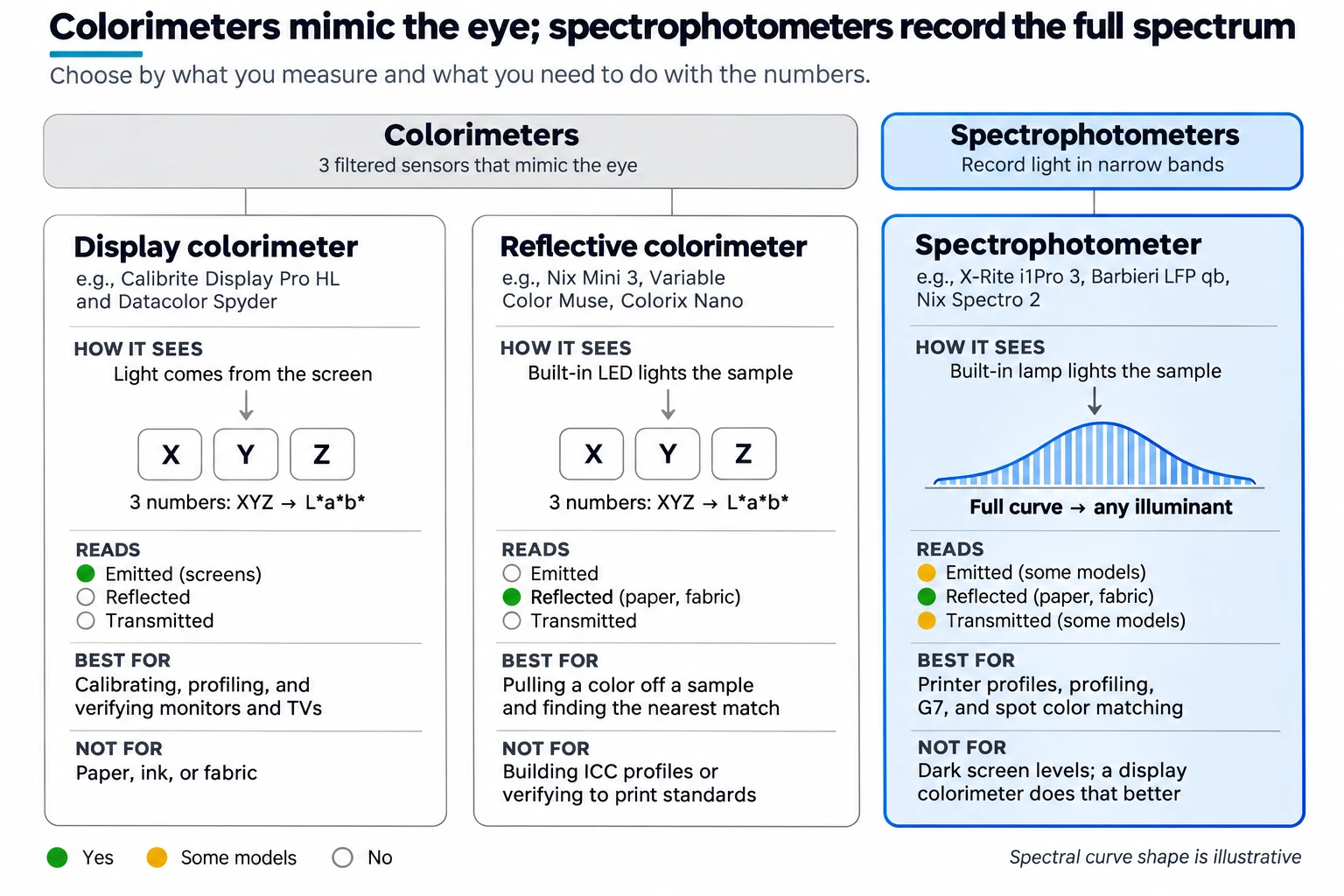
1. The real difference: filters vs. the full spectrum
2. Display colorimeters: built for screens
3. Reflective colorimeters: pocket color pickers
4. Spectrophotometers: the print workhorse
5. Where densitometers fit
6. Match the device to the job
If you need to…
Buy
Why
Calibrate, profile, and verify monitors
Display colorimeter
Fast, accurate on screens, and the most affordable option
Soft proof on screen against a print standard
Display colorimeter (plus a spectro if you also print)
The screen needs a colorimeter; the print side needs spectral data
Pull a color off a sample and find the closest library match
Reflective colorimeter or compact spectro
Good enough for color communication and design choices
Build ICC profiles for inkjet, wide-format, or dye-sub
Spectrophotometer, ideally automated
Profiles need spectral data and hundreds of patches
Verify proofs, run G7, or check press conformance
Spectrophotometer with M1 support
Standards specify spectral measurement and measurement conditions
Match spot or brand colors
Spectrophotometer
Spectral data handles metamerism and different viewing light
Profile backlit film or display graphics
Spectrophotometer with transmission mode
Reflection-only instruments can't read light through the media
Measure printed textiles
Spectrophotometer with a larger aperture
Fabric texture needs a bigger measurement area to average out
Handle both monitors and printers
A display colorimeter and a spectro, or a spectro with emissive mode
One tool for each job is usually the better result
Before You Buy
Getting Started
dang@aldertech.comSources
About the Author

Dan Gillespie