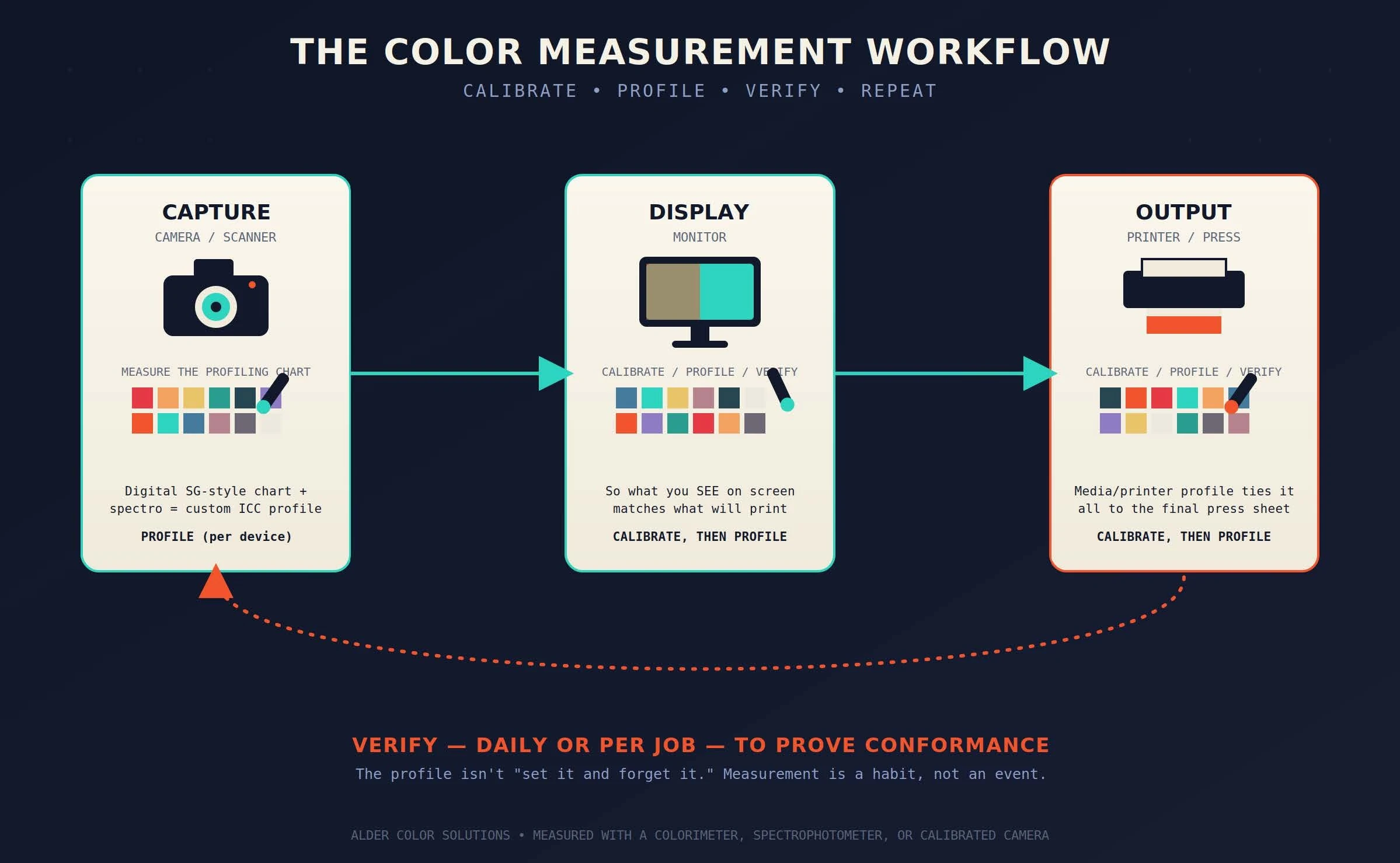
Everybody loves to talk about "color management" like it's some mystical black box. It's not. Strip away the acronyms and the fancy software, and color management comes down to one very unglamorous activity: measuring color, over and over again. That's it. That's the secret. I say this to clients all the time and I usually get a blank stare — so let's break it down. Every device in your workflow — your camera or scanner, your monitor, and your printer or press — needs to be defined in a language that software understands. Your operating system (Mac or Windows) needs a display profile. Adobe Creative Cloud (Photoshop, Illustrator, InDesign, Acrobat) needs reference and device color-space profiles. Your RIP (Fiery XF, ONYX, PrintFactory, whatever you're running) needs a printer/media profile. Once all of those definitions exist, the software can actually do its job — intelligently converting color from one device to the next, so what you shot, what you see, and what comes off the press all agree with each other. None of that happens by accident. Every one of those definitions comes from measuring something. So the real question isn't "do you have color management," it's: What are you measuring, and how often are you doing it? Before we walk the workflow, let's get our vocabulary straight — because these three words get thrown around interchangeably, and they're not the same thing. Here's the part people miss: profiling is not the finish line. Once color management is established, the ongoing job is verification — routinely measuring to prove color conformance. That's the quality-control piece, and it's the part that quietly falls apart in most shops, because nobody's assigned to keep doing it. Every digital image starts somewhere — shot with a digital camera or scanned, usually on a flatbed these days (though high-end drum scanners are still out there for the diehards). That capture device can, and should, be profiled. Here's how: you shoot or scan a physical profiling chart. For cameras, the go-to is the Digital SG chart, made by Calibrite (you might remember them as GretagMacbeth, then X-Rite). That chart ships with published reference values for every patch — but here's the catch: those published values are averaged across production runs, not measured from your specific chart. Every chart is slightly different. So if you really want to tighten things up, you measure your own chart with a spectrophotometer and use those custom values as your reference instead of the generic ones. That one extra step gives you a noticeably more accurate profile right from the start of the workflow — which matters, because every downstream step inherits whatever error you baked in at capture. Once the capture side is squared away, you need to trust what you're looking at. Using calibration software paired with a spectrophotometer, you can calibrate, profile, and verify your display. If your monitor is lying to you, everything downstream is a guess. Finally, those images, vector graphics, and documents get printed — on a digital printer or a traditional press. Same three moves apply: calibrate, profile, verify. And just like with capture and display, it's all done by measuring. Getting everything calibrated and profiled once feels like crossing the finish line. It isn't — it's the starting line. Once color management is established, you need to be routinely measuring — daily, or for every job, depending on your operation — to prove conformance and make sure your devices haven't drifted. Ink changes, media lots change, lamps age, machines get serviced — color moves. Measuring is how you catch it before your client does. Not all measurement devices are created equal. Colorimeters are entry-level and pretty limited in what they can do. When we talk seriously about color management in printing and graphic arts, we're talking about spectrophotometers — instruments from companies like Barbieri, X-Rite, and Techkon. (Cameras are increasingly being used as measurement devices too, which is a whole conversation on its own.) Color management isn't a product you buy once and forget about — it's a habit built on measurement. Capture, display, output, repeat. If you can't remember the last time you verified your devices, that's your answer to "what are you measuring." Questions, or want a second set of eyes on your workflow? Reach out — I'm happy to talk through it. Director of Technical Services, Alder Color Solutions Dan has spent more than three decades helping printers, converters, publishers, packaging companies, and photographers get control of their color — across offset, flexo, wide-format, digital, and packaging production. He founded the color consultancy ColorGeek Inc. in 1999 and joined Alder in 2018. A certified G7 Expert since the inaugural 2006 class, he has spent nearly twenty years implementing G7 and international print standards in real production environments, and was one of the few certified instructors for the SGIA Digital Color Professional program. He's also a professional photographer — which keeps him fluent in both the artistic and technical sides of imaging.Why Measuring Is the Whole Game
Profiling vs. Calibration vs. Verification
Walking the Workflow
Capture: Camera or Scanner
Display: Your Monitor
Output: Printer or Press
The Part Nobody Wants to Hear
A Quick Word on Devices
The Bottom Line
Schedule a Consultation
Dan Gillespie — dang@aldertech.comAbout the Author

Dan Gillespie