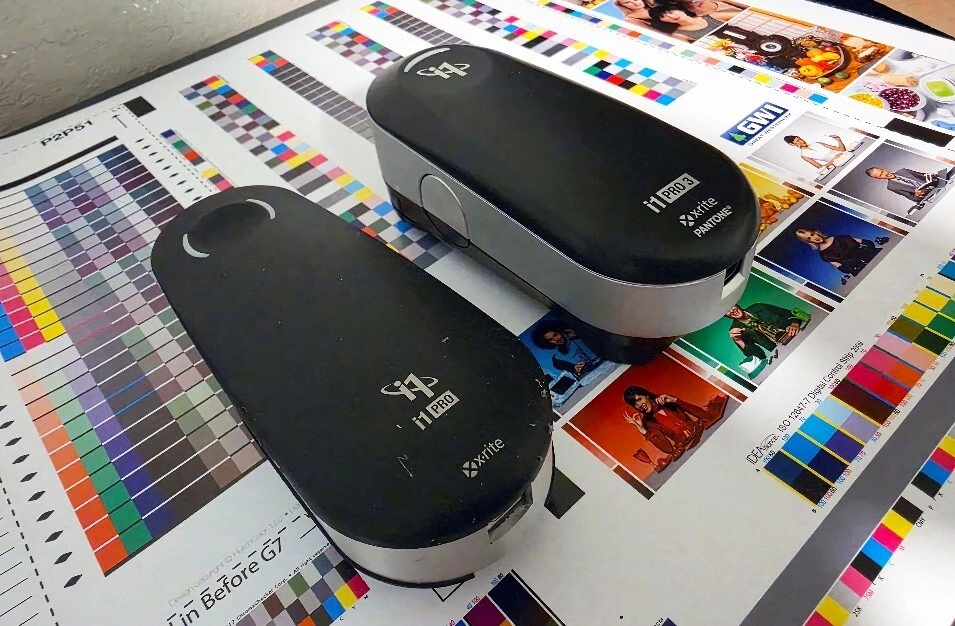
If your shop verifies color with an i1Pro1 or i1Pro2, there's a Windows problem worth knowing about before it finds you mid-shift. Windows 11 has been tightening the digital signature requirements for hardware drivers. The i1Pro1 and i1Pro2 rely on drivers signed under earlier standards. X-Rite has not announced re-signed drivers for those legacy instruments, and based on where the product line sits today, we don't expect them to. In practical terms: a routine Windows update can leave the instrument unable to talk to the PC. No warning, no useful error, no workaround. Just a device that stops connecting. If that instrument is how you verify press sheets or proofs, that isn't an inconvenience. It's a hole in your quality control at the moment you can least afford one. Plenty of shops aren't sure. The i1Pro, i1Pro2, and i1Pro3 look similar on a bench, and the unit that came with a proofing system five years ago may not be the one anyone remembers buying. See the photo in Figure 2 below which shows i1Pro, , i1Pro2, and i1Pro3 from left to right. If you're not certain, send us a photo of the instrument and its serial number and we'll tell you which generation you have and whether it's affected. Identify which generation each of your instruments is. Most shops have more than one, and they're often different vintages. The photo above shows the i1Pro2 and i1Pro3. If you have a silver/gray one that says 'Gretag' on it, it's even older. You might also have a device that looks just like this one that is labeled 'ES2000' or 'ES3000' from EFI/ Fiery. They are similar but may have less functionality. If you're running an i1Pro1 or i1Pro2, plan the replacement on your schedule rather than after an update breaks a press check. The i1Pro3 is the current-generation instrument, built for current operating systems and actively supported driver signatures, so you're not exposed the next time Windows pushes a change. Retiring an aging instrument on your own timeline is a much better position than discovering the hard way that it stopped working mid-shift. A spectrophotometer is what turns color from an opinion into a number. It gives you objective, repeatable data you can compare against a target, track over time, and hand to a customer as proof of quality. Shops that measure consistently see fewer reprints and faster press approvals, and they can answer a brand owner's color requirements with data instead of assurances. Losing that capability without warning costs more than the instrument did. Alder Color Solutions works with printers on exactly this kind of understand what's at risk with older hardware, and plan an upgrade path that fits your workflow and budget. We can quote new instruments and handle the details. If you're not sure whether your i1Pro is affected, or you want to talk through what an i1Pro3 upgrade looks like for your shop, reach out. We'd rather help you plan ahead than help you scramble. Contact Bill Owen: billo@aldertech.com Lead Color Specialist, Alder Color Solutions Bill is an Idealliance-certified G7 Expert and founder of Elevated Color, with more than 45 years in prepress, printing, and color management — including over 25 years dedicated to helping printers achieve predictable, repeatable color across commercial, packaging, wide-format, offset, digital, and inkjet work. He specializes in G7 implementation, ICC profiling, press and monitor calibration, proofing systems, and workflow standardization, with deep experience across RIPs including EFI Fiery XF, PrintFactory, ChromaChecker, Onyx, Caldera, and Xitron Navigator, and platesetter workflows such as Agfa Apogee, Kodak Prinergy, Esko, and Heidelberg Prinect. His work has appeared in PRINTING United, Idealliance, and WhatTheyThink.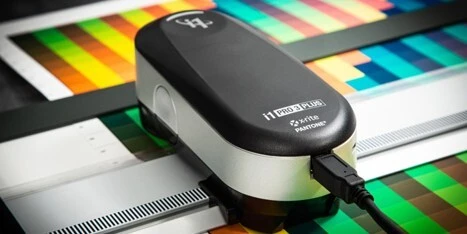
Which Instrument Do You Actually Have?
What to Do Before the Next Update
Why This Is Worth Moving On
We Can Help
About the Author

Bill Owen
Phone: 720-933-4413