Proofing these days is pretty much exclusively done with inkjet printers coupled to RIP software. Calibrations and profiles are created with a spectrophotometer to achieve an optimal print condition, then defined for each media and print condition. The color space of the target reference is also chosen in the color settings.
In North America, the most common target is GRACoL2013 Coated (aka CRPC6), specified and published by Idealliance.
The Three G7 Master Printer Categories
Idealliance offers a qualification program called G7 Master Printer, in which a G7 Expert submits measured color data and physical printed forms that are double-checked for conformance. There are three categories:
Category
What it measures
Grayscale
Tonality and three-color gray balance only.
Targeted
Everything above, plus solid CMYK and RGB overprints.
Colorspace
Requires measuring the IT8.7/5 chart (previously TC1617) — 1,617 patches. These are the patch values contained in the GRACoL2013 Coated dataset and profile. It's the most challenging to pass.
Our Results — and the Challenge
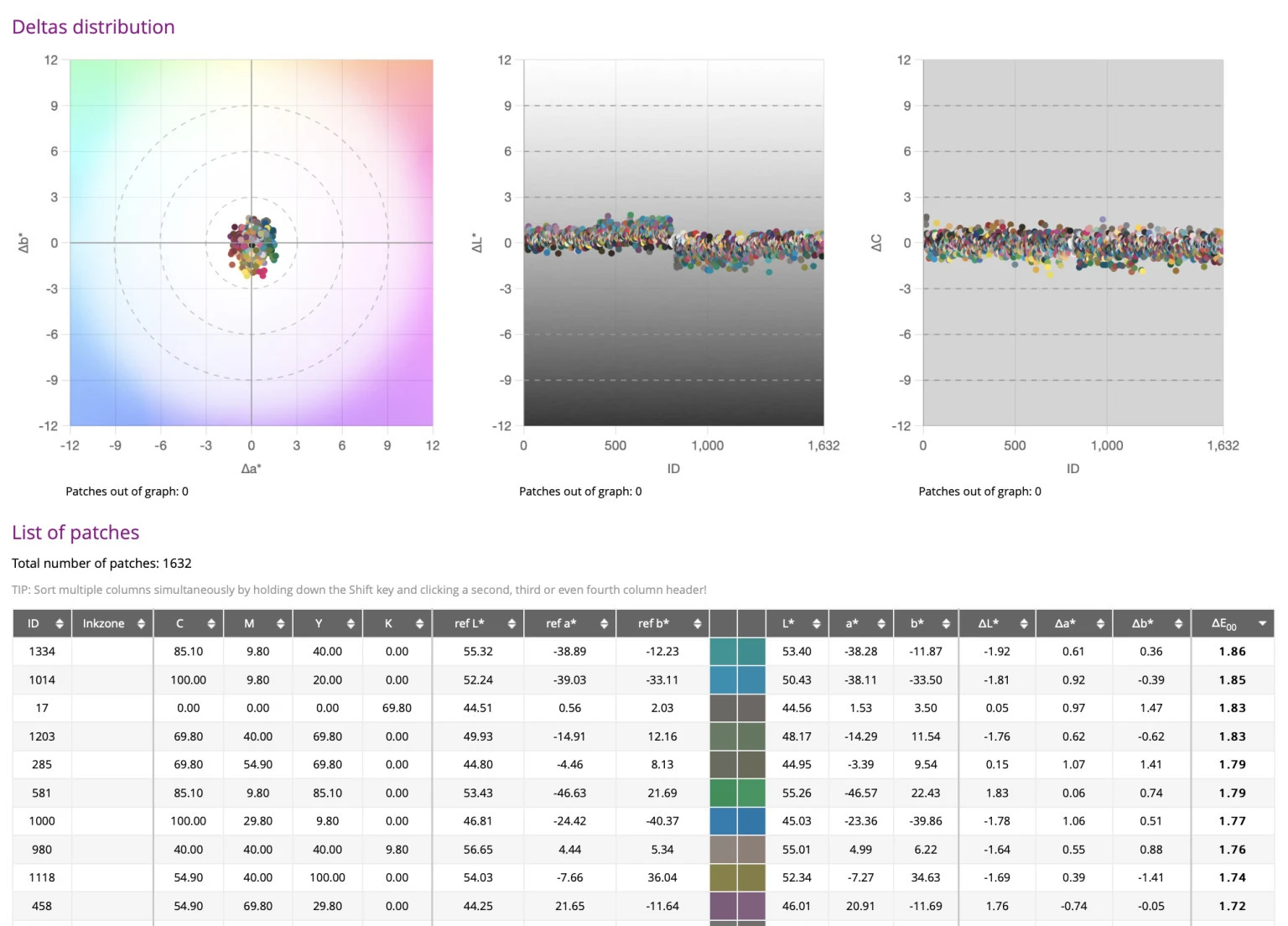
I thought I'd share the results we typically get, explain how we verify conformance, and invite everyone to see if they can do better.
These results were achieved with an Epson SureColor P7000 Standard (CMYK, Lc, Lm, LLk, Lk, O, G), a Fiery XF RIP, and an X-Rite i1 Pro 3 with iO 3 table.
For G7 Colorspace, there are tolerances you must not exceed:
Metric
G7 Colorspace tolerance
Our result
Average
1.5 dE2000
0.57
95th percentile
3.0 dE2000
1.24
Maximum
5.0 dE2000
1.86
Our G7 Colorspace conformance results — comfortably inside every tolerance.
These results are about as good as they get, regardless of what hardware and software you're running. But we're challenging you to beat us.
How to Verify Your Own Proofer
If you haven't yet done a full colorspace conformance verification on your proofer, now's a better time than ever. You can do this using ChromaChecker Capture software — register for a free trial here.
The process:
Add your printer and a track for your data, using the GRACoL2013 Coated profile and the G7 Proof Colorspace tolerance set (both included).
Import the IT8.7/5 chart — it's already in the Public Library.
Create a Scanning Template for your spectrophotometer. This generates the artwork of the charts you need to print.
Print the charts, launch Capture, and measure. You'll see your results.
Then share them with us at info@aldertech.com if you'd like. We have some cool freebies for anyone who can better our numbers.
Need a Hand?
As always, if you want help with this — or anything color management or process control related — our professional services are available remotely, by the hour, and can be purchased online: 1-Hour Remote Support Block.
Good luck, and let us know how you do.
About the Author
Dan Gillespie
Director of Technical Services, Alder Color Solutions
Dan has spent more than three decades helping printers, converters, publishers, packaging companies, and photographers get control of their color — across offset, flexo, wide-format, digital, and packaging production. He founded the color consultancy ColorGeek Inc. in 1999 and joined Alder in 2018.
A certified G7 Expert since the inaugural 2006 class, he has spent nearly twenty years implementing G7 and international print standards in real production environments, and was one of the few certified instructors for the SGIA Digital Color Professional program. He's also a professional photographer — which keeps him fluent in both the artistic and technical sides of imaging.
Questions? Contact Dan at Alder Color Solutions: Email: dang@aldertech.com